Deeper into widgets
Let’s make a widget that the player can interact with. Here I’ll make one where the player has two decisions. One will do nothing and the other will teleport the player.
Here is the basic setup. Notice I made the text a parent of its button:

In my actor Blueprint (any object in the level the character would overlap with) I create the widget (I named it Type, it could be called anything), pause the main game play, make it so we can use our mouse and set the input to be only for the UI (user interface, aka widget).

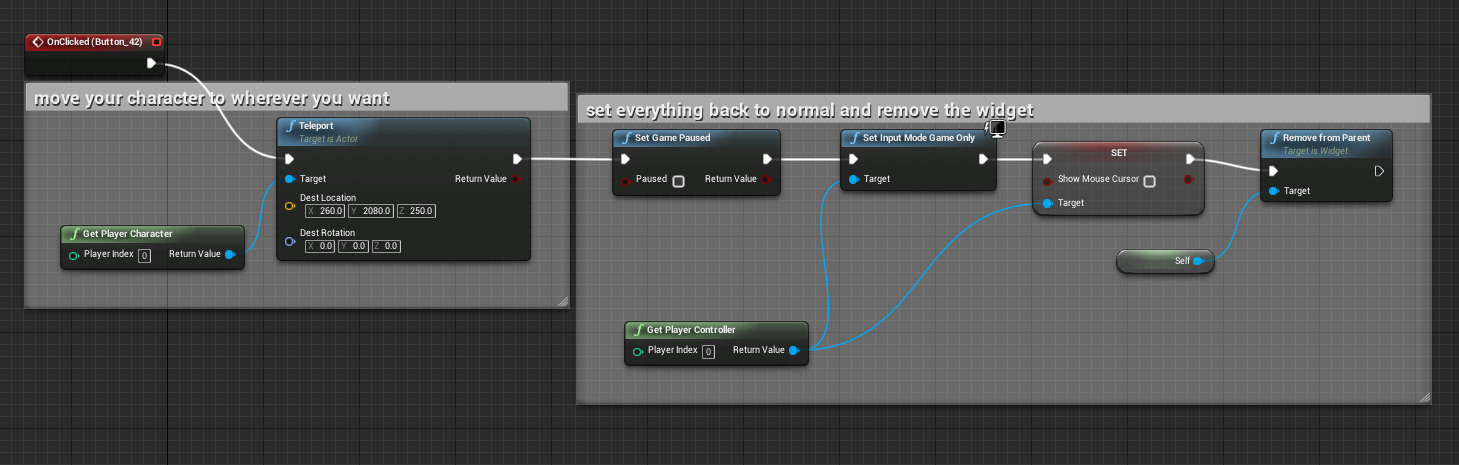
Then in the Graph section of the widget I first teleported the character and then set everything back up how it was so the character can keep playing. (You don’t need the ref to self in the Remove from Parent. It’s there by default)