I want to make a countdown clock that stores its time between levels. For example, say a player has 200 seconds to search 4 different levels for one object. Usually, if I stored the time in a Player blueprint, it would reset when I went into the next level. To prevent this I need to create a GameInstance Blueprint that stores my variables that I don’t want to reset on starting the next level. This is obviously also very useful for player health, items collected, etc.
Below you can see my setup. To create the GameInstance I clicked the green “Add New” button and made a Blueprint Class. It’s not a “Common” class so I folded down all and then did a search for GameInstance. I also need to set it in the Project Settings under Maps & Modes at the bottom.
In the game instance I only put one Integer variable called “INSTANCE_totalTime”and left it at 0.

Then in the level Blueprint, on Event Tick I subtracted the Game Time in Seconds from my countdown time (CountdownFromMe…set to 100) and set it to the INSTANCE_TotalTime by casting to myGameInstance.

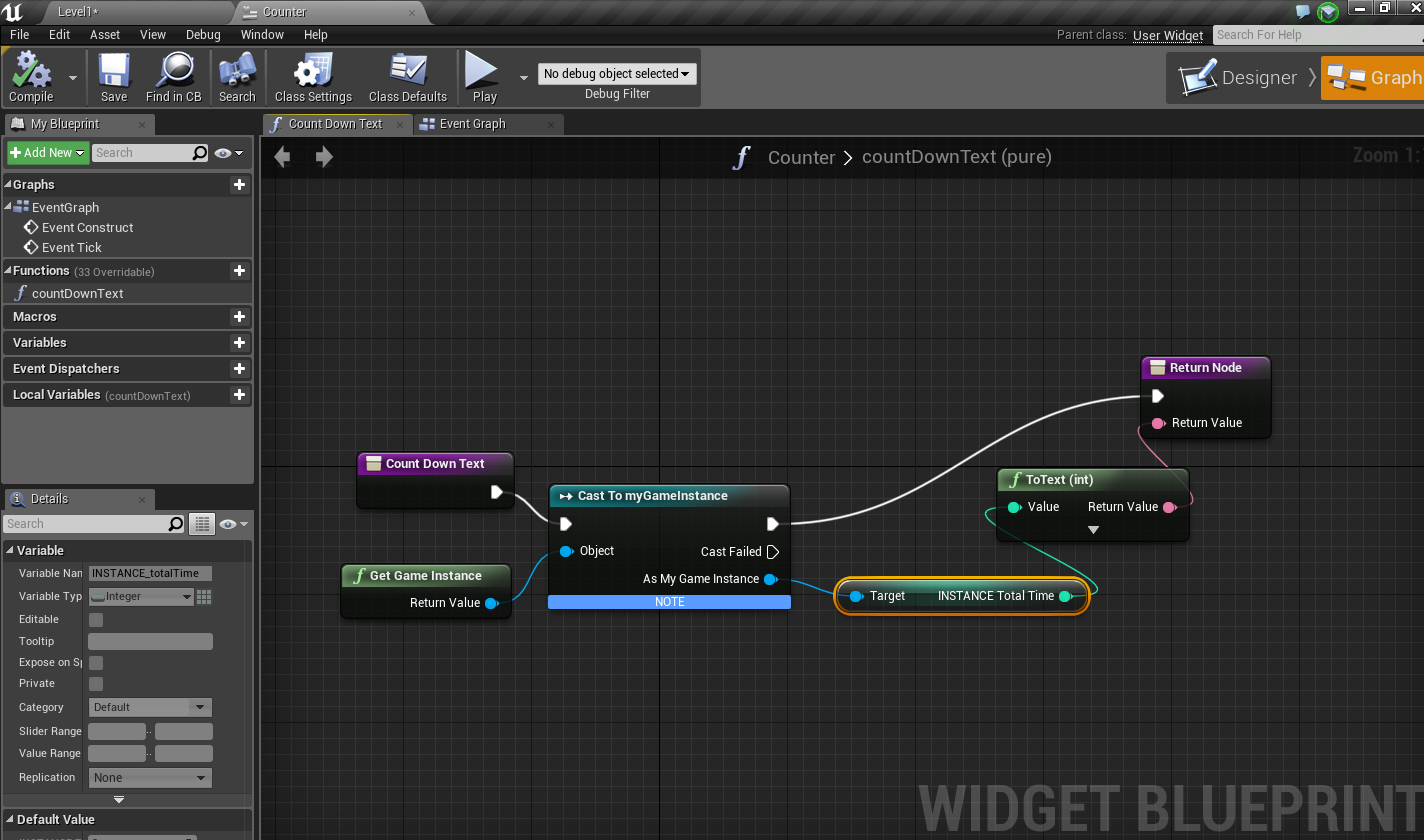
I also made a widget to display the countdown on screen. I casted to myGameInstance in the widget to get the total time.
TO FIGURE OUT ON YOUR OWN – how do you make something happen when the timer runs out? How do you stop the timer if something else happens?